Tournament LiveScope Setup with Mirrored Screens for Better Garmin Sonar Viewing During Fishing Events
During a fishing event, you have limited time to study a spot, read fish movement, and decide what to do next. Your sonar screen needs to fit the way you compete. If your Garmin display is hard to see from your casting position, you may spend more time checking the electronics than you want. A well-planned tournament LiveScope setup focuses on making supported sonar information easier to view from the area where you fish.
NorthWave Marine offers waterproof marine monitors for compatible screen mirroring applications. Instead of replacing a working Garmin unit just to change the viewing position, you can explore a secondary screen that displays supported content from the source device. The aim is to build a setup around your fishing habits, boat layout, and electronics, with compatibility confirmed before you buy.
Turn Your Boat Layout into a Competitive Advantage
A tournament boat has several work areas. The console may hold your main electronics, while the bow is where you spend time casting and watching the water. Your display plan should account for both areas rather than treating the screen as an isolated piece of equipment.
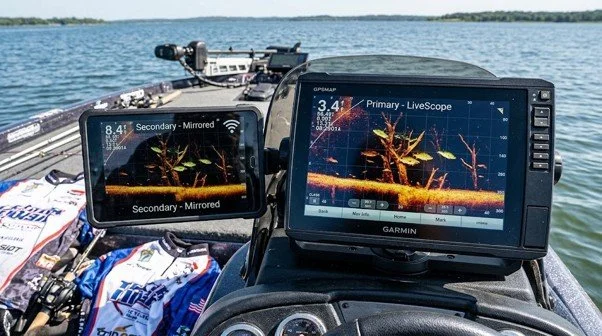
Think about the tasks you perform most often. You may need to watch sonar information while keeping your eyes on the water, change casting angles, or move around the front deck. A secondary display near your usual fishing position can provide another view of supported Garmin content, if your system supports the required connection.
The key is to fit the monitor into your routine. A screen should not block your rod movement, cover essential controls, or make the deck feel crowded. Before choosing a display, mark the space you want to use and check the view from your normal standing position. This gives you a more useful starting point than selecting a screen by size alone.
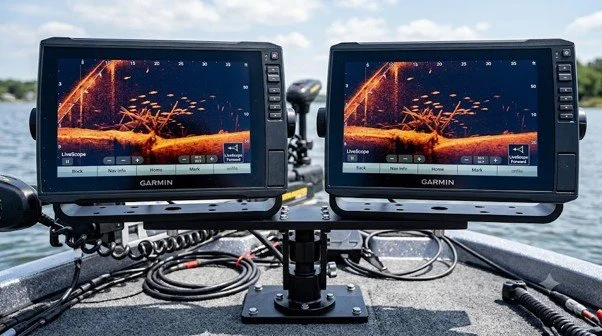
Read the Details Before Choosing a Mirrored Display
Screen mirroring depends on the connection between the source electronics and the monitor. A compatible Garmin unit must provide a suitable video output, and the secondary display must accept that signal. Not every Garmin fish finder offers the same connection options, so the exact model matters.
Check the source unit's technical specifications, video output type, monitor input, and supported resolution. You may also need suitable cables or connection hardware. A display cannot mirror your sonar information simply because it is designed for marine use or has a large screen.
NorthWave Marine offers LITE, WAVE, and MAX monitors for suitable marine mirroring applications. The LITE range includes a 16-inch display, the WAVE range includes 18.5-inch and 19-inch displays, and the MAX range includes a 22-inch display. These options give anglers different screen sizes to consider, but the right choice still depends on the source unit, connections, and available mounting space.
Make Screen Size Work for Your Casting Position
The best display is one you can read comfortably from the place you fish. A screen that looks clear from close range may be harder to read from the other side of the deck. A larger monitor offers more viewing area, but it also needs more space and a secure mount.
Measure the mounting area before deciding on a screen. Consider the distance between your eyes and the monitor, possible glare, and the angle at which you will view it. Check that the display will not interfere with trolling motor controls, rod storage, or other equipment you need during an event.
Think about the people who use the boat, too. If another angler shares the front deck, the screen should be placed so it remains useful without getting in the way. A clear view and an open working area matter more than choosing the largest monitor available.
Test Your Setup Before the Tournament Clock Starts
A screen mirroring setup should be checked on the boat before an event. Confirm that the expected content appears on the monitor, that the picture is clear, and that the cables remain secure during normal boat movement. Test the display from your usual casting position rather than judging it only from the console.
Plan cable routes with care. Wires should stay clear of walkways, sharp edges, moving parts, and places where fishing lines or gear could catch them. The mounting point should hold the monitor firmly, and the installation should follow the instructions for each device.
It is also worth checking how the screen fits into your normal routine. Can you see the display without leaning across the deck? Can you reach your controls without moving around it? A short practice session can reveal issues that are easier to fix before competition begins.
Know the Difference Between a Bigger View and Better Sonar
A mirrored display changes where you can see supported information. It does not create separate sonar readings, increase LiveScope range, improve target detection, or change the accuracy of the original system. Those functions depend on the compatible Garmin electronics, transducer, installation, and operating conditions.
This distinction helps you choose a monitor for the right purpose. If your goal is to view existing sonar information from a more useful location, a compatible mirrored screen may suit your needs. If you want to change sonar performance, a secondary monitor alone will not do that.
Choose Your Tournament Display with NorthWave Marine
Your boat setup should help you spend your time fishing, not working around a screen that is difficult to view. A compatible secondary monitor can provide another viewing point for supported Garmin content while your main unit remains in place.
At NorthWave Marine, our waterproof LITE, WAVE, and MAX monitors offer different screen sizes for suitable marine mirroring applications. Start with your Garmin model and confirm the video connection. Then compare screen size, mounting space, and viewing distance to find an option that fits your boat.
Visit NorthWave Marine to compare our marine monitor options and plan a tournament LiveScope setup that fits your electronics, your casting position, and your fishing routine.
Frequently Asked Questions
-
A compatible mirrored screen lets you view supported Garmin information from another boat location. This can improve screen access while you cast, without replacing your main electronics.
-
Confirm your Garmin model, supported video output, monitor input, resolution, cable needs, and mounting space. These checks help prevent compatibility problems before tournament day.
-
Choose a screen based on viewing distance, available deck space, glare, and casting position. NorthWave Marine offers LITE, WAVE, and MAX displays in different sizes.
-
No, a larger monitor provides more viewing area but does not improve sonar range or accuracy. These depend on the compatible Garmin electronics, transducer, and setup.
-
Test the video connection, check image clarity, secure the mount, and route cables safely. Confirm that the screen remains easy to view from your casting position.