Advanced Bass Boat Display Upgrade Options with Waterproof Screens for Garmin Marine Electronics
A clear screen can make a big difference during a fishing trip. It helps you read sonar images, follow maps, and view underwater details with less effort. However, a small display can make these tasks harder, especially during long hours on the water. A bass boat display upgrade gives anglers a practical way to improve screen visibility without replacing their entire marine electronics system.
NorthWave Marine offers waterproof marine displays designed to mirror compatible Garmin screens. These displays give anglers another place to view their existing screen, such as the bow, while keeping the original head unit at the helm. This setup helps you access important fishing information from the spot where you need it most.
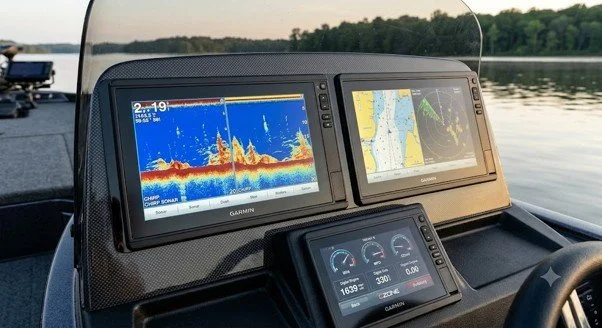
Why Upgrade Your Bass Boat Display?
Bass boats often have limited dash space. A factory-installed screen may work well at the helm but feel too small for comfortable viewing from the bow. Small text, sonar details, and map features can be harder to see from a distance.
A larger secondary display can help solve this problem. It lets you view compatible Garmin screen content from another location on your boat. You can keep your current head unit and add a screen that better suits your fishing style.
NorthWave Marine offers large waterproof marine displays for anglers who want more screen space and greater flexibility. The right setup depends on your existing equipment, available mounting space, and preferred viewing position.
For example, an angler at the bow may want to check sonar images without walking back to the helm. A mirrored display can make this easier. It also helps keep key information within view as you move around the boat.
Is Your Chartplotter Screen Too Small?
If your LiveScope screen is too small for comfortable viewing, a larger secondary display can make sonar images easier to view from the bow. Forward-facing sonar helps anglers study underwater targets and structures. A screen that is easier to see can make it more convenient to follow this information during fishing.
NorthWave Marine provides waterproof displays for compatible marine screen mirroring setups. These displays let you view supported Garmin screen content from another position on the boat.
A larger screen does not change the sonar data produced by your LiveScope system. It gives you another viewing option. Check the display connection, supported resolution, and head unit compatibility before selecting a monitor for your boat.
Think about your usual fishing position, too. If you spend most of your time on the front deck, a screen mounted near the bow may suit your needs. It can help you view sonar images without leaving your fishing spot. The final setup should match your equipment and how you use your boat.
Improve LiveScope Viewing with a Larger Screen
A Chartplotter screen too small for your needs can make it harder to read maps, check routes, and view navigation details from the bow. This can be frustrating during a busy fishing session, especially if you need to move between the helm and the front deck.
A mirrored marine display gives you another viewing point without requiring you to move back to the original screen each time. You can check compatible chartplotter information from a more convenient position.
Before choosing a display, check your Garmin head unit model and its supported video output. Screen mirroring depends on equipment compatibility and the connection method. A suitable setup helps ensure the secondary display shows the content you need.
Screen size also matters. A larger monitor can make maps and other details easier to view from your fishing position. However, the screen should fit the available space and allow you to move safely around the deck. Check the mounting area before selecting a display.
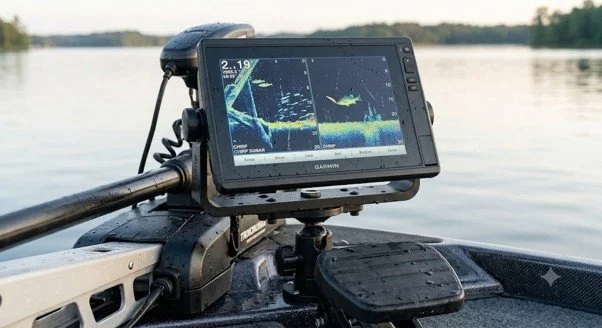
Choosing the Right Waterproof Marine Display
A marine display must suit the conditions on your boat. Water exposure, sunlight, mounting space, and viewing distance all affect your choice.
Consider these points before selecting a screen:
Waterproof construction: Choose a display designed for marine use and exposure to water.
Screen size: Select a size that fits your mounting area and remains easy to view from your fishing position.
Garmin compatibility: Confirm that your existing equipment supports the required mirroring connection.
Screen clarity: Look for a display that provides clear images and readable details in your usual fishing conditions.
Mounting location: Check that the screen fits securely at the bow or another suitable position without blocking controls or movement.
NorthWave Marine offers 16-inch LITE displays, 18.5-inch and 19-inch WAVE displays, and 22-inch MAX displays. These options help boat owners choose a screen size that suits their available space and viewing needs.
Before you buy, review your current system and think about how you will use the new screen. Check the available power supply, mounting space, and connection options. These simple checks can help you choose a display that works with your boat.
Is Marine Screen Replacement the Right Choice?
Your boat's display should support the way you fish. A larger secondary screen can help you view compatible navigation and sonar information from the bow without moving away from your fishing position. NorthWave Marine offers waterproof marine displays built for compatible screen mirroring setups. Our LITE, WAVE, and MAX display options give anglers more choice in screen size and placement. Whether you want a larger view of compatible Garmin sonar or need another screen at the bow, start by checking your current equipment and display needs. The right setup can make important fishing information easier to view during your time on the water.
Visit NorthWave Marine to explore our marine display options. Check your Garmin system's compatibility, choose a screen that fits your boat, and find a display solution that makes your fishing setup more convenient.
Upgrade Your Fishing Setup with NorthWave Marine
A marine screen replacement may be needed if your current display is damaged, faulty, or no longer meets your needs. However, replacing the original unit is not always the only option for improving screen visibility.
If your existing Garmin head unit works well, a compatible mirrored display may offer a practical alternative. You can retain your current electronics while adding another screen for convenient viewing.
The best choice depends on your goal. A damaged unit may need repair or replacement, while a working unit with a small screen may benefit from a secondary display. Check your system's connections and compatibility before making a decision.
It is also useful to consider the main problem with your current setup. If the screen works well but is hard to see from the bow, adding a mirrored monitor may meet your needs. If the original unit has a fault, a new secondary display may not fix it. Check the cause before choosing your next step.
Frequently Asked Questions
-
A bass boat display upgrade adds a larger or secondary marine screen to improve viewing. NorthWave Marine offers waterproof displays for compatible Garmin screen mirroring setups.
-
Yes, some Garmin systems support secondary display connections. Check your head unit model, video output, and connection options to confirm compatibility with NorthWave Marine displays.
-
A larger screen gives you more space to view compatible sonar images. It can make underwater details easier to see from the bow during fishing.
-
Check screen size, waterproof design, mounting space, connection type, and Garmin compatibility. NorthWave Marine offers several display sizes to suit different boat layouts.
-
Not always. If your existing head unit works and supports screen mirroring, a compatible secondary display can provide a larger viewing area without replacing it.