Forward-Facing Sonar Display for Boat Installations with Large Secondary Screens for Garmin Fish Finders
A fish appears on your sonar screen, but your attention is on the front deck. You want to read the target, judge its position, and make your next cast without stepping away from the bow. This is where screen placement becomes a real part of your fishing setup. The right display can bring supported sonar information closer to where you make decisions.
NorthWave Marine offers waterproof marine monitors for compatible Garmin screen mirroring setups. Our displays give anglers another way to view supported screen content without automatically replacing the original fish finder. For boat owners who want a clearer view from the front deck, a secondary screen can be a useful part of a carefully planned electronics setup.
Put Forward-Facing Sonar Information Where You Fish
Forward-facing sonar helps anglers view underwater activity ahead of the boat. Depending on the sonar system and conditions, the display can show fish targets, bottom features, and underwater structure. Reading these details while casting can be harder if the main screen is mounted at the helm.
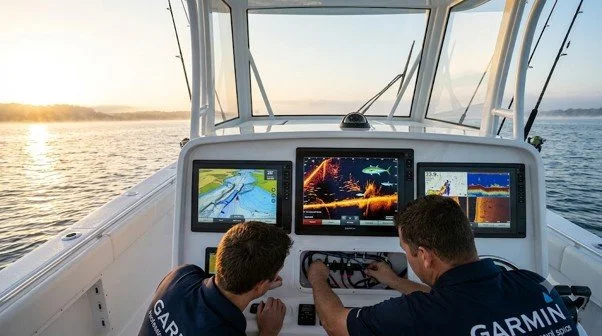
A forward-facing sonar monitor for boat use can provide a second viewing point if the source equipment supports the required connection. Instead of relying on a screen across the boat, you can view compatible content from a monitor positioned near your fishing area. This can make the setup more convenient for anglers who spend much of their time on the bow.
The key is to plan the screen around your actual fishing movements. Think about where you stand, where your rods move, and how you follow sonar information during a cast. The display should support your routine rather than become another obstacle on deck.
What Changes When You Move to a Forward-Facing Sonar Big Screen?
A larger screen provides more viewing area, but its value depends on how you use it. If you stand several feet from the display, a larger image may be easier to read than a small screen near the helm. It can also give you more room to view sonar details without leaning toward the display.
A forward-facing sonar big screen is worth considering if your current display feels cramped or sits too far from your fishing position. Still, a larger monitor does not make sonar more accurate, extend its range, or improve target detection. Those functions depend on the sonar equipment, settings, installation, and conditions in the water.
NorthWave Marine offers several display sizes, allowing you to compare options based on your boat layout. Consider the viewing distance, glare, available mounting area, and the screen's position relative to your normal stance. The goal is a screen that is easy to read and practical to use, not simply the largest one that fits.
One Important Detail: A Mirrored Screen Is Not a Second Sonar Unit
A secondary monitor and a second fish finder are not the same thing. A compatible mirrored display shows supported content from the connected source system. It does not automatically operate as an independent sonar unit or create a separate sonar view.
Before choosing a forward-facing sonar display, identify your exact Garmin fish finder or chartplotter model. Check its supported video output, the connection method required by the monitor, and any resolution limits. Do not assume that every Garmin device can send its screen to an external display.
If your goal is to view the same sonar information at the helm and bow, screen mirroring may suit your needs if the equipment supports it. If you want independent sonar views or separate controls at each position, confirm that your system supports those functions before buying anything. This distinction helps you choose a solution that matches your real goal.
Match the Display to Your Boat, Not Just Your Budget
The right monitor should fit your boat's layout and the way you fish. NorthWave Marine offers the 16-inch LITE, 18.5-inch and 19-inch WAVE, and 22-inch MAX display options. Each provides a different viewing area, so the best choice depends on your mounting space, preferred viewing distance, and compatible connection method.
A compact screen may suit a boat with limited bow space. A larger option may work better on an open front deck where you view the display from farther away. Check that the monitor will not block controls, limit movement, or interfere with fishing gear. Also consider whether you can adjust its angle to reduce glare during normal use.
Before making your choice, measure the intended mounting area and review the monitor's installation requirements. Confirm power needs and cable routes as well. These practical checks help you narrow down the right display before arranging installation.
Give Your Installer a Clear Plan Before Work Begins
A good installation starts with clear information. Tell your marine electronics installer which Garmin unit you own, what content you want to view, and where you want the monitor mounted. Share the display specifications so the installer can check the connection and mounting requirements before fitting the screen.
Ask how the system will be tested after installation. The monitor should receive the supported output, the power connection should meet its requirements, and the mount should be secure. Cables should be routed away from footpaths and moving parts. Follow the product instructions and use a qualified professional if you need help with electrical work.
Planning these details first can reduce installation surprises and help you get a setup that fits your fishing habits.
Make NorthWave Marine Part of Your Next Sonar Upgrade
A better sonar viewing setup begins with knowing what your current electronics can do and where you need to see the information. NorthWave Marine offers waterproof monitors for compatible screen mirroring systems, with several display sizes to suit different boat layouts.
Visit NorthWave Marine to compare our LITE, WAVE, and MAX displays. Check your Garmin model, review the supported connections, and choose a screen that fits your boat and fishing position. The right combination can give you a more practical view of supported sonar information, right where you need it.

Frequently Asked Questions
-
A forward-facing sonar display shows supported underwater information from a compatible sonar system. NorthWave Marine monitors offer another viewing point for anglers using compatible Garmin equipment.
-
A larger monitor provides more screen area and may make sonar details easier to view. It does not increase sonar range, accuracy, or target detection.
-
No. Compatibility depends on your Garmin model, supported video output, connection method, and display requirements. Check your equipment specifications before choosing a NorthWave Marine monitor.
-
Check viewing distance, sunlight, mounting space, cable routing, and safe movement around the deck. NorthWave Marine offers different display sizes for varied boat layouts.
-
Not automatically. A mirrored monitor displays supported content from the connected source. Independent sonar functions require compatible equipment designed to provide those features.