Lowrance Active Target Screen Mirroring Solutions for Compatible Marine Electronics and Boat Displays
You are watching fish move near your lure, but your Lowrance display sits too far away to check the sonar view with ease. Each glance back toward the console takes your attention away from the water. For anglers who spend long hours casting from the bow, screen placement can affect how comfortably they use their electronics.
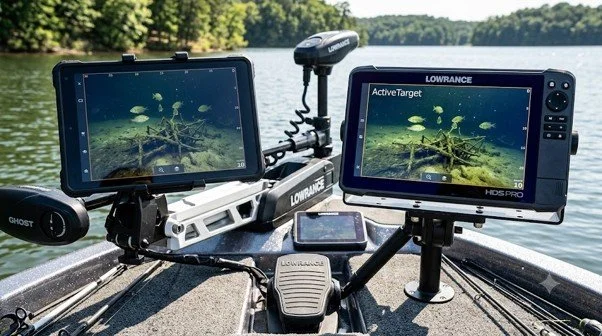
A compatible screen mirroring setup gives you another way to view supported information from your existing marine system. With an Active Target bigger screen, you can plan a viewing point that better suits your casting position without assuming you need to replace your main display. At NorthWave Marine, our waterproof marine monitors offer screen mirroring options for compatible electronics, helping anglers plan a setup around their boat and fishing style.
What Lowrance Active Target Screen Mirroring Actually Does
Lowrance Active Target provides forward, down, and scout views of underwater activity, depending on the compatible system and setup. A secondary display can make supported screen content easier to view from another area of the boat, provided the source unit supports the required video connection.
A Lowrance Active Target screen setup should begin with one important question: can your existing unit send a video signal to the monitor you want to use? Screen mirroring does not automatically work with every Lowrance fish finder. The source unit, available output, monitor input, and connection hardware must work together.
This check helps you avoid choosing a display based only on its size or appearance. Your aim is to make the information from your current system easier to see, while keeping the original electronics in place. It also helps you focus on a clear goal: placing supported sonar information closer to the spot where you fish.
Match Your Lowrance Unit to the Right Display
Not every marine display can connect directly to every fish finder. Before selecting a monitor, identify the exact Lowrance model and review its supported video output options. Then check the monitor input and any connection hardware required to carry the signal between the two devices.
NorthWave Marine offers waterproof display options in several sizes for suitable mirroring applications. The LITE 16-inch monitor suits layouts with less mounting space. The WAVE range offers 18.5-inch and 19-inch options, while the MAX 22-inch monitor provides a larger viewing area for boats with room for it.
These sizes serve different viewing needs, but screen size alone does not confirm compatibility. Check the technical details of your Lowrance system before choosing a monitor. If the unit does not support a suitable video output, a direct mirroring connection may not be possible without another supported solution.
It is also useful to check the screen's supported resolution and input type. A monitor must accept the signal from the source device to show the picture correctly. Ask for confirmation of the required connections before buying cables or planning the installation. This simple step can help prevent equipment mismatch and save time during setup.
Choose a Screen That Fits Your Fishing Position
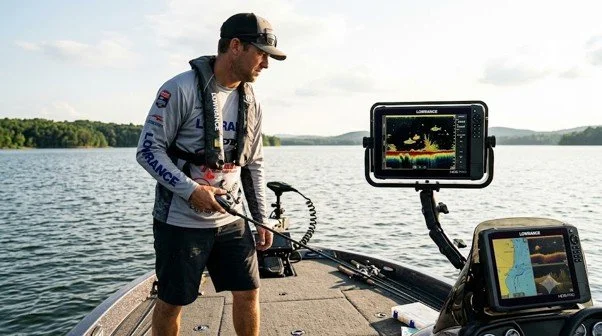
The best place for a secondary screen depends on how you fish. Anglers who cast from the front deck may prefer a monitor mounted near the bow. This can make supported sonar information easier to check without returning to the console after each cast.
Think about the distance between your eyes and the screen. A larger monitor may be easier to read from farther away, but it also needs more room and a secure mounting point. Check the space around your trolling motor controls, rod storage, and other deck equipment before deciding on a location.
The viewing angle matters, too. Position the screen so you can see it from your normal standing spot without blocking your view of the water. A well-planned layout should help you use your electronics comfortably while leaving enough room to move and cast.
Consider glare from direct sunlight as part of your plan. The screen should be easy to view from your usual position, and its placement should not force you to change your stance during a cast. Marking the proposed screen location before installation can help you judge the available space and viewing angle.
Plan the Connections Before Installation
A reliable mirroring setup starts with the right connection plan. Check the required video cables, compatible inputs, cable length, and mounting hardware before fitting the display. Route cables away from walkways, sharp edges, moving parts, and areas where fishing gear could catch them.
Marine conditions also call for secure mounting and suitable protection for connections. Follow the instructions for each device, and make sure the monitor is designed for the conditions at its intended location. If you are unsure about video compatibility or installation, ask a qualified marine electronics installer to review the system before you buy.
Plan access to the connections, too. You may need to inspect or service the setup later, so avoid placing cables and connectors in spots that are hard to reach. A tidy installation makes the display easier to maintain and helps keep your deck clear during fishing.
A Bigger Screen Changes the View, Not Sonar Performance
A larger secondary monitor can provide more viewing area, but it does not improve sonar range, target detection, or the accuracy of Active Target readings. Those functions depend on the compatible Lowrance electronics, transducer, setup, and operating conditions.
A mirrored monitor also does not automatically become an independent fish finder. It displays supported content from the connected source. Knowing this difference helps you choose equipment for the problem you want to solve: screen visibility and placement, rather than sonar performance itself.
If you already like the information your Lowrance system provides, a secondary display focuses on making that information easier to see from another location. It is a viewing solution, not a replacement for the source unit or its sonar equipment. This distinction helps you set clear expectations before choosing your monitor.
Find Your Marine Display Solution with NorthWave Marine
Your electronics should work with the way you fish. If the main Lowrance display is difficult to view from your preferred casting position, a compatible secondary monitor may give you a more convenient view of supported information without moving your existing unit. At NorthWave Marine, our LITE, WAVE, and MAX waterproof monitors offer different screen sizes for suitable marine mirroring setups. Review your Lowrance model, connection options, viewing distance, and available mounting space before selecting a display. Our range gives you options to consider for different boat layouts, provided your electronics support the required connection.
Visit NorthWave Marine to compare our marine monitor options and plan a screen mirroring setup that suits your boat, your electronics, and the way you fish.
Frequently Asked Questions
-
Check your Lowrance model, supported video output, monitor input, cable needs, and mounting space. These details help confirm whether your planned mirroring setup is suitable.
-
Yes, if your source unit supports a suitable video connection and the monitor accepts that signal. Confirm compatibility before choosing a secondary marine display for your boat.
-
Choose a screen based on viewing distance, available mounting space, sunlight exposure, and your casting position. NorthWave Marine offers LITE, WAVE, and MAX display sizes.
-
No, a larger monitor provides more viewing area but does not improve sonar range or accuracy. Performance depends on the compatible electronics, transducer, installation, and conditions.
-
Identify your source unit, confirm video connections, measure the mounting area, and plan safe cable routes. Consult a qualified marine electronics installer if compatibility remains unclear.