Marine Dual Screen Setup for Bass Boats Using Garmin-Compatible Monitors for Better Fishing Visibility
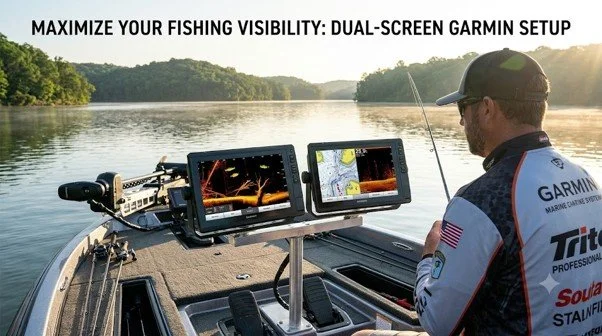
Fishing often demands attention in more than one place. You may need to watch sonar returns, study a map, and stay focused on the water ahead. A single display can limit how easily you view this information from different parts of your bass boat. A well-planned bass boat dual-screen setup gives you more freedom to view compatible marine data from the helm and the bow.
NorthWave Marine offers waterproof monitors designed for compatible Garmin screen mirroring systems. Our displays help boat owners add another viewing point without automatically replacing their existing head unit. The goal is simple: make useful fishing information easier to see from the place you need it.
Plan Each Screen Around Your Fishing Style
A dual screen setup works best if each display has a clear purpose. Before choosing your monitors, think about where you spend the most time and which information you need to view during different parts of a fishing trip.
The helm screen can remain your main control point for navigation and system operation. A second display near the bow can provide a convenient view of supported screen content as you fish from the front deck. This layout can reduce unnecessary movement between the two areas.
Your ideal setup will depend on your fishing habits. Anglers who spend long periods casting from the bow may value a screen placed within easy view. Those who move around the boat often should consider sightlines, mounting position, and safe access to controls.
It also helps to plan your screen positions before buying a monitor. Sit or stand in your usual fishing spots and check which areas are easy to see. Think about the space needed for rods, tackle, and other gear. A screen should help you fish, not get in the way of your normal movements.
Get a Better View of Garmin LiveScope
Garmin LiveScope provides sonar views that help anglers study fish and underwater structures. These details can be useful during casting, but their value depends partly on how comfortably you can view the display from your fishing position.
A second screen for Garmin LiveScope gives you another viewing option if your existing Garmin equipment supports the required connection. Instead of returning to the helm to check the screen, you can view mirrored content from a monitor placed near the bow.
This arrangement can be useful for anglers who want to keep their attention on their casting area while checking sonar information. The secondary monitor displays supported content from the connected system. It does not improve the sonar signal itself or create new sonar data.
Before planning the installation, confirm the exact Garmin model, video output support, and connection requirements. These details matter because screen mirroring is not supported in the same way across every marine electronics setup.
A clear view can also help you follow the information on screen without leaning toward the display or changing your position often. Choose a location that feels natural to use during fishing. Keep in mind that sonar readings still need to be understood alongside water depth, boat movement, and your fishing conditions.
Think Beyond Screen Size
A larger display can improve visibility, but size alone does not determine whether a dual screen setup will work well. The screen should suit the distance from which you view it, the available mounting area, and the conditions on your boat.
Consider these practical details:
Viewing angle: Position the screen so you can read it from your normal fishing stance.
Sunlight: Check how clearly the display can be viewed in the light conditions you usually face.
Mount stability: Choose a secure mounting point that can handle normal boat movement.
Cable routing: Keep wires away from footpaths, moving parts, and areas where gear is handled.
Power access: Confirm the monitor's power needs before finalising the layout.
A thoughtful installation can make the display easier to use and help keep the deck organised. Follow the monitor's installation instructions and seek qualified help if you are unsure about wiring or mounting.
You should also consider how the monitor will fit with other equipment. Leave enough room to reach buttons, open storage areas, and move safely around the deck. A screen that fits well into your boat layout is often more useful than one chosen only for its size.
Find a Monitor That Fits Your Boat
NorthWave Marine offers waterproof marine displays in several sizes to support different installation needs. Our range includes the 16-inch LITE, 18.5-inch and 19-inch WAVE, and 22-inch MAX displays.
Each option provides a different screen area. A compact display may suit a tight mounting space, while a larger monitor may be better for viewing from farther away. The right choice depends on your boat layout, preferred viewing position, and the output supported by your Garmin system.
Before selecting a monitor, measure the available space and review the connection details for your current equipment. Do not assume that every head unit can mirror its screen to an external display. Checking compatibility first helps you make a more informed choice.
It is useful to take note of the screen's planned position, the distance from your eyes, and the cable route before placing an order. These simple steps help you compare display options based on your real needs rather than screen size alone.
Avoid Common Dual Screen Setup Mistakes
One common mistake is buying a monitor before confirming how the existing electronics connect to it. Screen size and waterproof construction matter, but neither guarantees compatibility.
Another mistake is mounting the display where it looks convenient at first but becomes hard to see while fishing. Check the viewing angle from your normal position before completing the installation. Also, make sure the screen does not block essential controls or restrict safe movement around the boat.
Finally, decide what you expect the second screen to do. If your goal is to view the same compatible Garmin content from another location, screen mirroring may suit your needs. If you want two independent views or separate control of different functions, confirm that your equipment supports that arrangement before purchasing.
Do not forget to check the full installation plan before using the system on the water. Make sure the monitor is firmly mounted, the cables are secure, and the screen can be viewed from your chosen position. Testing the setup at the dock gives you a chance to spot problems before a fishing trip.
Build Your Dual Screen Setup with NorthWave Marine
A useful dual screen layout starts with your fishing habits, your boat's available space, and the capabilities of your existing electronics. The right monitor can make compatible navigation and sonar information easier to view from more than one position.
At NorthWave Marine, our waterproof monitor range gives bass boat owners options for planning a setup around their needs. Our LITE, WAVE, and MAX displays offer different screen sizes, so you can consider the space available on your boat and the viewing area you prefer.
Visit NorthWave Marine to explore our LITE, WAVE, and MAX displays. Review your Garmin model, check its connection options, and choose a monitor that suits your boat and the way you fish. A well-planned setup can help keep key fishing information in view while you stay focused on the water.
Frequently Asked Questions
-
A dual screen setup lets anglers view compatible navigation and sonar information from different boat locations. NorthWave Marine monitors offer flexible viewing options for fishing.
-
Yes, if your Garmin equipment supports the required screen mirroring connection. Check your head unit model, video output, and monitor requirements before choosing a NorthWave Marine display.
-
Consider mounting space, viewing distance, and screen visibility from your fishing position. NorthWave Marine offers LITE, WAVE, and MAX displays in several sizes for different layouts.
-
Check Garmin compatibility, power needs, cable routing, mounting stability, and viewing angle. NorthWave Marine recommends confirming connection requirements before selecting a display for your boat.
-
A second monitor provides another view of compatible screen content but does not improve sonar signal quality or create new data. Proper compatibility and placement support easier viewing.