Garmin LiveScope Screens with Expanded Viewing Options for Garmin GPSMAP Marine Electronics
You have invested in marine electronics to make better choices on the water. But if your sonar view is limited to the screen at the helm, you may struggle to follow the details from your casting position. A dedicated viewing point near the bow can make your setup more practical, especially if you spend long periods watching sonar while working a lure.
NorthWave Marine offers waterproof marine monitors for compatible screen mirroring setups. Our displays give boat owners more ways to arrange their viewing space without assuming they need to replace a working GPSMAP unit. The key is to match the monitor to your equipment, the information you want to see, and the space available on your boat.
Stop Choosing a Screen by Inches Alone
The best screen for LiveScope is not always the biggest one. It is the screen that lets you read the information comfortably from your normal fishing position. A large monitor can offer more viewing area, but its usefulness also depends on mounting height, viewing distance, sunlight, and the layout of your boat.
Think about what you need to see. Are you checking sonar from the front deck while casting? Do you want a larger view of supported screen content at the helm? Or are you planning a second viewing point so you can check information without walking between areas? Each goal can lead to a different screen size and mounting plan.
NorthWave Marine offers several monitor sizes for different layouts. Before choosing one, measure the mounting space and consider how far away you will stand or sit. The right fit should give you a clear view without blocking controls, rods, tackle, or safe movement around the boat.
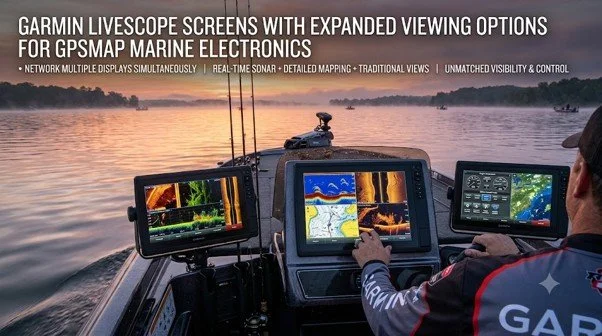
Garmin Panoptix LiveScope Screen Choices: Start with Your GPSMAP Model
A Garmin Panoptix LiveScope screen setup needs more than a monitor that looks suitable. The source equipment must support the connection required to send its display content to an external screen. Garmin GPSMAP models differ, so compatibility should be checked for the exact unit rather than assumed from the brand name.
First, identify your GPSMAP model and review its supported video output options. Next, check the monitor's input requirements, supported resolution, and connection method. These details help determine whether the screen can show the content you want. If the required output is not supported, a monitor alone will not solve the problem.
It is also important to understand the difference between mirroring and independent sonar operation. A compatible mirrored monitor displays supported content from the connected source. It does not automatically create a second sonar feed, offer separate controls, or improve the data collected by the transducer.
Build a LiveScope Viewing Station Around Your Casting Position
A LiveScope display for bass boat use should be planned around the way you fish, not just the location where a screen can fit. If you spend most of your time at the bow, the display should be easy to view from that spot. You should not have to twist your body or move away from your casting area just to read the screen.
Start by checking the space available near the front deck. Look at the screen from your usual stance and consider glare at different times of day. Make sure the display will not interfere with rod movement, storage lids, or other controls. A secure mount and a clear cable route are also important on a moving boat.
NorthWave Marine offers three display families to help you compare sizes: the 16-inch LITE, the 18.5-inch and 19-inch WAVE, and the 22-inch MAX. Each option suits different space and viewing needs. Your choice should depend on your boat layout and confirmed connection requirements, not screen size alone.
Know What Your Display Can and Cannot Do
A larger monitor can make supported information easier to view, but it does not increase LiveScope range, improve target detection, or make sonar readings more accurate. Those functions depend on the sonar system, transducer placement, settings, and conditions in the water. A screen upgrade is mainly a change to how you view the information.
This distinction matters if you are comparing a secondary monitor with a new fish finder. A mirrored display may be a useful choice if your current Garmin unit works well and supports the required output. If you need a separate sonar source or independent operation, check what equipment is required before making a purchase.
Before installation, confirm power needs, connection types, mounting requirements, and cable routing. Follow the manufacturer's instructions and consult a qualified marine electronics professional if you are unsure about the setup.
Choose Your NorthWave Marine Display with a Clear Plan
The right monitor should fit your boat and solve a specific viewing problem. NorthWave Marine offers waterproof LITE, WAVE, and MAX displays for compatible screen mirroring applications. Our range gives you options to compare based on available space, preferred viewing distance, and the capabilities of your Garmin GPSMAP system. Before selecting a display, have your GPSMAP model number ready and identify where you want the screen mounted. Confirm that your equipment supports the required connection, then compare monitor sizes that fit your layout. This approach helps you choose based on the needs of your setup rather than guesswork.
Visit NorthWave Marine to compare our waterproof marine displays. Review the LITE, WAVE, and MAX options, check your Garmin connection requirements, and select a screen that fits your fishing position. A well-planned viewing setup can help you keep supported sonar information in sight while you stay focused on your next cast.
Frequently Asked Questions
-
Consider viewing distance, mounting space, sunlight, and Garmin compatibility. NorthWave Marine offers different monitor sizes to suit boat layouts and supported screen mirroring setups.
-
No. Compatibility depends on the exact GPSMAP model, supported video output, connection method, and display requirements. Check your unit specifications before choosing a NorthWave Marine monitor.
-
A larger screen offers more viewing area, but it does not increase sonar range or accuracy. It displays supported information from your existing compatible system.
-
Choose a secure location that suits your casting position, viewing distance, and available space. Keep controls accessible and cables clear of walkways and moving parts.
-
NorthWave Marine offers the 16 inch LITE, 18.5-inch and 19-inch WAVE, and 22-inch MAX displays for suitable compatible screen mirroring applications.