LiveScope Accessories That Bring Your Existing Garmin Display Closer to Your Fishing Position
A fish appears on LiveScope, but your Garmin display is behind you at the console. You turn to check the screen, look back at the water, and try to connect what you saw with your next cast. That small gap between your fishing position and your electronics can make active fishing harder than it needs to be. LiveScope accessories that support a second viewing point can help put your existing Garmin information within easier sight, so you can focus more on casting and less on moving around the boat.
NorthWave Marine helps anglers explore waterproof marine display options for compatible Garmin electronics. Rather than replacing a working fish finder just to change its viewing location, a suitable mirror display can provide another place to view supported screen content. The first step is to understand how your current electronics send video to another monitor and what your boat needs for a useful setup.
Turn One Garmin Display into a More Flexible Viewing Setup
Your Garmin screen already serves a purpose at the helm. It can show sonar information, navigation details, and other supported data, depending on your unit and settings. Yet, the console may not be the best place to view LiveScope during every part of a fishing session. A secondary display gives you another viewing point without forcing you to relocate the main unit.
This approach is especially useful for anglers who spend much of their time on the front deck. You can plan a viewing position around your casting style, boat layout, and line of sight. The secondary monitor mirrors supported content from the source device, so it relies on the original Garmin system rather than producing separate sonar readings. That distinction helps you choose the right equipment for your actual needs.
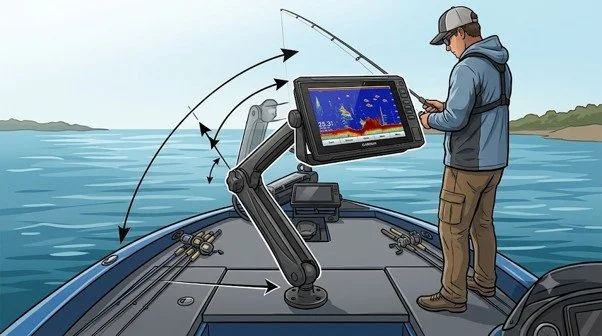
The Connection Detail That Decides Whether Your Setup Works
A large monitor alone cannot guarantee a successful LiveScope display setup. The key question is whether your Garmin unit supports a suitable video output and whether the chosen monitor accepts that signal. Garmin models can differ in their connection options, so check the exact model and its technical specifications before purchasing any display or cable.
Your setup may require compatible video connections, suitable cables, and a mounting solution that fits your boat. Cable length and routing also matter because the connection must reach the secondary display without crossing walkways or interfering with boat controls. Confirming these details first can help prevent a common mistake: buying a screen that looks right but cannot connect to the existing electronics as planned.
It also helps to check the screen resolution and the type of signal your Garmin unit sends. The monitor must support the signal for the picture to display correctly. Ask the supplier to confirm the connection requirements for your exact model rather than relying on the screen size or brand name alone.
Choose Screen Space That Matches the Way You Fish
The best display size depends on where you stand, how far away you view the screen, and how much space your boat offers. A screen that looks large at home may feel cramped beside other equipment, while a display that is too small may be difficult to read from your casting position. Measure the intended mounting area and consider the viewing angle before making your choice.
NorthWave Marine offers three display ranges to consider for suitable marine mirroring applications. The LITE 16-inch display suits setups with more limited mounting space. The WAVE 18.5-inch and 19-inch displays provide other options for anglers who want more screen area. The MAX 22-inch display offers a larger viewing surface for layouts that can accommodate it. Actual suitability depends on the connection, mounting space, and requirements of your Garmin system.
Think about how you will use the screen during a normal fishing trip. You should be able to read the display from your usual standing position without leaning over other equipment. A larger screen can make details easier to see from farther away, but only if there is enough room to mount it safely. The right choice balances screen size, viewing comfort, and available deck space.
Build a Bow Display That Works with Your Boat
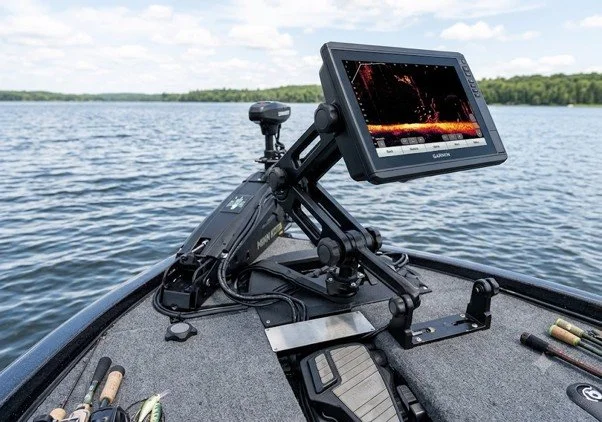
A useful secondary screen should fit into your fishing routine, not compete with it. Think about glare, viewing distance, deck movement, and the equipment already installed near your preferred casting position. The monitor should be easy to see without blocking your view of the water or limiting access to trolling motor controls and other gear.
Mounting strength is just as important as screen size. Boat movement, vibration, and exposure to water make a secure installation essential. Plan the cable route before fixing the monitor in place, and keep connections protected according to the equipment manufacturer's instructions. A clean layout helps keep the fishing area practical and reduces the chance of cables becoming a distraction during use.
Before installation, check that the chosen mounting area can support the monitor and that the screen will not block access to storage, switches, or other controls. Leave enough room to reach the connections for service or checks. These simple steps help create a setup that feels natural on the boat and remains practical during regular use.
Know What LiveScope Accessories Can and Cannot Change.
A compatible secondary monitor changes where you view supported Garmin content, not how the sonar system collects information. It does not independently create LiveScope readings, extend sonar range, improve target detection, or increase the accuracy of the source device. These functions depend on the compatible Garmin electronics, transducer, installation, and operating conditions.
Understanding this difference helps you invest in the part of your setup that needs improvement. If your main concern is screen location, a mirrored display may be the right option. If your concern is sonar performance, the issue may involve a different part of your electronics system. Identifying the problem first makes it easier to select equipment that serves a clear purpose.
Bring Your Garmin View Closer with NorthWave Marine
Your fishing setup should support the way you actually fish. If your Garmin screen is in the wrong place for watching LiveScope from the bow, a compatible secondary display can offer a more practical way to view supported information while keeping your main unit at the helm. At NorthWave Marine, our waterproof marine display options include the LITE, WAVE, and MAX ranges for suitable mirroring applications. Before choosing a monitor, check your Garmin model, supported video output, required connections, and available mounting space. Our display options give anglers different screen sizes to consider based on their boat layout and viewing needs.
Visit NorthWave Marine to compare display options and find a setup designed around your boat, your electronics, and the place you fish from most.
Frequently Asked Questions
-
Check your Garmin model, supported video output, monitor input, cable needs, screen size, and mounting space. These details help confirm whether your planned display setup is suitable.
-
Yes, a compatible marine monitor can mirror supported content from your existing Garmin unit. Compatibility depends on video output, display input, connections, and model specifications.
-
Choose a screen based on viewing distance, available deck space, and mounting position. NorthWave Marine offers LITE, WAVE, and MAX displays in different sizes.
-
No, a secondary display changes where supported information appears. Sonar performance depends on the Garmin unit, transducer, installation, and operating conditions, not monitor size.
-
Select a firm mounting point, keep the screen clear of controls, and route cables away from walkways and moving parts. Follow equipment instructions to protect connections.