How Much Viewing Space Does a 22-inch Waterproof Monitor Provide on a Fishing Boat?
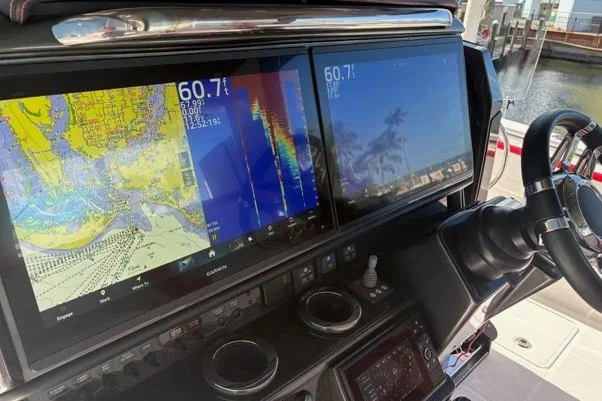
A 22 inch waterproof monitor for boat use gives anglers a wide screen for viewing compatible Garmin fishfinder and LiveScope output. The larger display can make sonar details easier to see from the bow, especially during long fishing sessions. At NorthWave Marine, our MAX 22-inch mirror monitor helps anglers add a larger viewing area without moving their main Garmin unit from the dash. The real benefit depends on screen placement, viewing distance, boat layout, and how you use sonar while fishing. A good screen setup can help you follow fish marks and underwater cover while keeping your attention on your fishing spot.
What Does a 22 Inch Screen Really Give You?
A 22-inch screen is measured diagonally from one corner to the opposite corner. It does not mean the display is 22 inches wide. The actual width and height depend on the screen's aspect ratio. This matters when you plan a mount or compare the space needed for different monitors. The outside size may also differ from the visible screen area, so check the product dimensions before you set aside space on your boat.
A larger screen gives you more room to view the image from a suitable distance. With compatible Garmin output, you can study fish marks, bait, and underwater cover on a broader display. However, screen size does not improve sonar range or create more data. It changes how the existing image is shown to you. NorthWave Marine offers the MAX 22-inch model for anglers who want a larger secondary view at the bow. This extra screen space can be useful if you prefer to stand farther from the monitor while casting.
See More of Your Sonar Without Crowding the Screen
LiveScope shows changes below the water in near real time. Fish, bait, and structure can appear as marks that change as the boat, lure, or fish moves. A wider viewing area can make it easier to inspect these details without feeling that the image is packed into a small screen.
This can help anglers who spend time casting toward fish, working a lure near cover, or watching activity around the boat. You can keep the sonar view near your fishing position instead of turning back toward the console. The value comes from easier viewing, not from a change in the sonar signal itself. Image clarity still depends on the source output, display settings, viewing angle, and lighting. For the best view, set the screen at a comfortable angle and adjust the brightness to suit the light around you.
Will a 22 Inch Monitor Fit Your Bow?
A large screen needs enough room for the monitor, mount, and cables. Before buying, measure the planned area and check the space around rods, trolling motor controls, storage lids, and walking paths. Make sure the display will not block your view of the water or get in the way as you move across the deck.
Think about your usual standing position, too. A screen that looks large on paper may be hard to read if it sits too far away or at the wrong angle. Direct sunlight can also cause glare. Choose a stable mounting point with a clear view and enough space to use nearby controls safely. NorthWave Marine encourages anglers to plan these details before selecting a display. Also check that the mount can hold the monitor firmly during normal boat movement.
Mirror Your Garmin View at the Bow
A marine mirror monitor shows the screen output from a compatible Garmin unit. It lets you view the same information in another part of the boat, while the main fishfinder or chartplotter stays at the dash. This can be useful for anglers who want a larger bow display without adding a second full sonar unit just to view the same output.
Compatibility must be checked before ordering. NorthWave Marine offers guidance for selected Garmin GPSMAP models, including the 1223xsv, 1523xsv, 1623xsv, 8410, 8412, 8416, 8610, 8612, 8616, and 9000 series. Support also includes non-touchscreen ECHOMAP Ultra 216 models. Confirm your exact unit and connection needs before choosing a monitor. Check the required cables and power supply as well, so your planned setup suits your current equipment.
Choose the Screen Size That Fits Your Fishing Style
NorthWave Marine offers three display sizes for different boat layouts. Our LITE 16-inch model suits anglers who need a compact secondary screen. The WAVE 19-inch provides a middle option with more viewing area. The MAX 22-inch is designed for anglers who want the largest screen in our range.
Your choice should reflect the space available and how far away you stand while fishing. A larger monitor may suit an open bow, while a smaller one may work better in a tight area. Check the screen dimensions, mounting space, power needs, and cable route before making your choice. A well-planned setup can make your sonar view easier to use throughout a fishing session. It can also help you avoid buying a display that takes up more room than your boat can spare.
Closing Thoughts:
A 22-inch monitor provides a broad viewing area, but the best choice depends on your boat and fishing habits. NorthWave Marine helps anglers compare screen sizes and check compatibility with selected Garmin systems. Think about where you fish most, how much room you have, and how far you stand from the screen. These simple checks can help you choose a monitor that fits your needs. If you need a smaller option, our LiveScope 19-inch display may suit your mounting space and viewing needs, provided your Garmin setup is compatible. Our LITE 16-inch model is another option for a more compact layout. Review the dimensions and connection requirements before making your final choice.
Ready to plan your display upgrade? Contact NorthWave Marine for compatibility guidance and help choosing the right screen for your boat.
FAQs:
Q1. How much viewing space does a 22-inch marine monitor provide?
A 22-inch monitor measures diagonally across the screen. Its width and height depend on the aspect ratio, so check NorthWave Marine's product dimensions before installation.
Q2. Can a 22 inch monitor improve Garmin LiveScope viewing?
Yes, a larger screen provides more viewing space for compatible Garmin output. NorthWave Marine's MAX model offers a broad display, but does not increase sonar range or data.
Q3. What should I check before mounting a large marine monitor?
Measure the mounting area, check cable routes, allow access to controls, and consider glare. NorthWave Marine can guide you through compatibility and installation planning.
Q4. Are NorthWave Marine mirror displays compatible with all Garmin units?
No. Compatibility depends on the exact Garmin model and connection method. Check NorthWave Marine's supported model list before choosing a mirror display for your boat.
Q5. Which NorthWave Marine monitor suits a smaller fishing boat?
The LITE 16-inch model may suit a compact layout, while the WAVE 19 inch offers a middle size. Check available space and compatibility before buying.